
Easy QuickBooks Error Fixes to Save Your Small Business

Authored by: Heather Schilling —Certified QuickBooks ProAdvisor | Date Published: May 07, 2026
QuickBooks has made accounting accessible to millions of small business owners who would otherwise need full-time bookkeepers just to keep the lights on. But “accessible” and “error-free” are two very different things.
The gap between them is where thousands of dollars disappear every year. What follows are the seven QuickBooks errors that consistently cost small businesses the most in dollars, time, stress, and missed opportunities.
Are You Making These QuickBooks Mistakes?
You’ve been handling QuickBooks yourself for years and were confident it was under control. Turns out, you’ve been misclassifying owner draws as business expenses, overstating your deductions, and understating taxable income.
Years of compounding mistakes. For your business? One very expensive lesson.
Like any tool, the outcome of using QuickBooks depends entirely on the person using it.
Let’s go through the six most common QuickBooks errors to help you figure out if it’s time to upgrade your business’s bookkeeping.
Misclassifying Expenses
This is the greatest beast of QuickBooks errors.
When you assign transactions to the wrong category, or just dump everything into “miscellaneous,” you’re doing two dangerous things at once: inflating some line items and deflating others. The IRS loves patterns. An unusually high “office supplies” figure next to a suspiciously low “meals and entertainment” is exactly the kind of thing that triggers a second look.
Beyond audits, misclassification means your profit-and-loss report is essentially fiction. You can’t make smart business decisions from data you can’t trust.
Delaying Bank Reconciliation
Reconciliation is the financial equivalent of balancing your checkbook. The problem is that most small business owners skip it for months at a time.
Every day you don’t reconcile, small errors compound. Duplicate transactions appear unnoticed. Fraudulent charges go unnoticed. Cleared transactions get entered twice.
Imagine a business owner discovering that a former employee had been charging personal expenses on a business credit card. By the time it was caught, the total was running into thousands. Monthly reconciliation would have caught it after the first hundred.
Confusing Owner Draws with Business Expenses
When a sole proprietor or LLC owner withdraws money from the business for personal use, that’s an owner’s draw, not a business expense. It does not reduce your taxable income, and treating it as one is tax fraud, whether intentional or not.
QuickBooks makes it easy to blur this line because cash is cash, and the software doesn’t know the difference between buying office supplies and groceries.
It’s up to you to know the difference. Many owners don’t, and the IRS eventually catches up.

Not Tracking Accounts Receivable
If you use accrual-based accounting and send invoices, unpaid invoices are sitting on your books as income even though the cash hasn’t arrived. If those invoices never get paid, you’ve technically “earned” the income and owe taxes on it. Writing off bad debt is a legitimate deduction but only reduces your tax liability if done correctly in QuickBooks.
Many business owners either forget to follow up on receivables or just delete the unpaid invoice. This creates a reconciliation nightmare.
Confusing Cash Basis and Accrual Basis
QuickBooks asks you early on, “Are you cash basis or accrual?”
What not to do: Pick one without fully understanding the difference or switch partway through a year without adjusting past records.
Here’s the difference:
- Cash basis records income when received and expenses when paid.
- Accrual records them when earned or incurred.
If you’re applying for a business loan, most lenders want accrual-basis financials. Questions will be asked if you filed taxes on a cash basis but present accrual-basis books.
Failing to Back Up Your Data
Reconstructing two to three years of data from bank statements is possible, but it takes weeks. It’s expensive. It’s entirely avoidable.
Here’s an important note:
If you’re using the QuickBooks desktop version, failing to back up to a secure cloud location regularly puts you in a dangerous spot. You’re one hard drive failure away from losing every financial record your business has ever generated.
Here’s what the risk looks like when you compare self-managed QuickBooks to professional bookkeeping support.
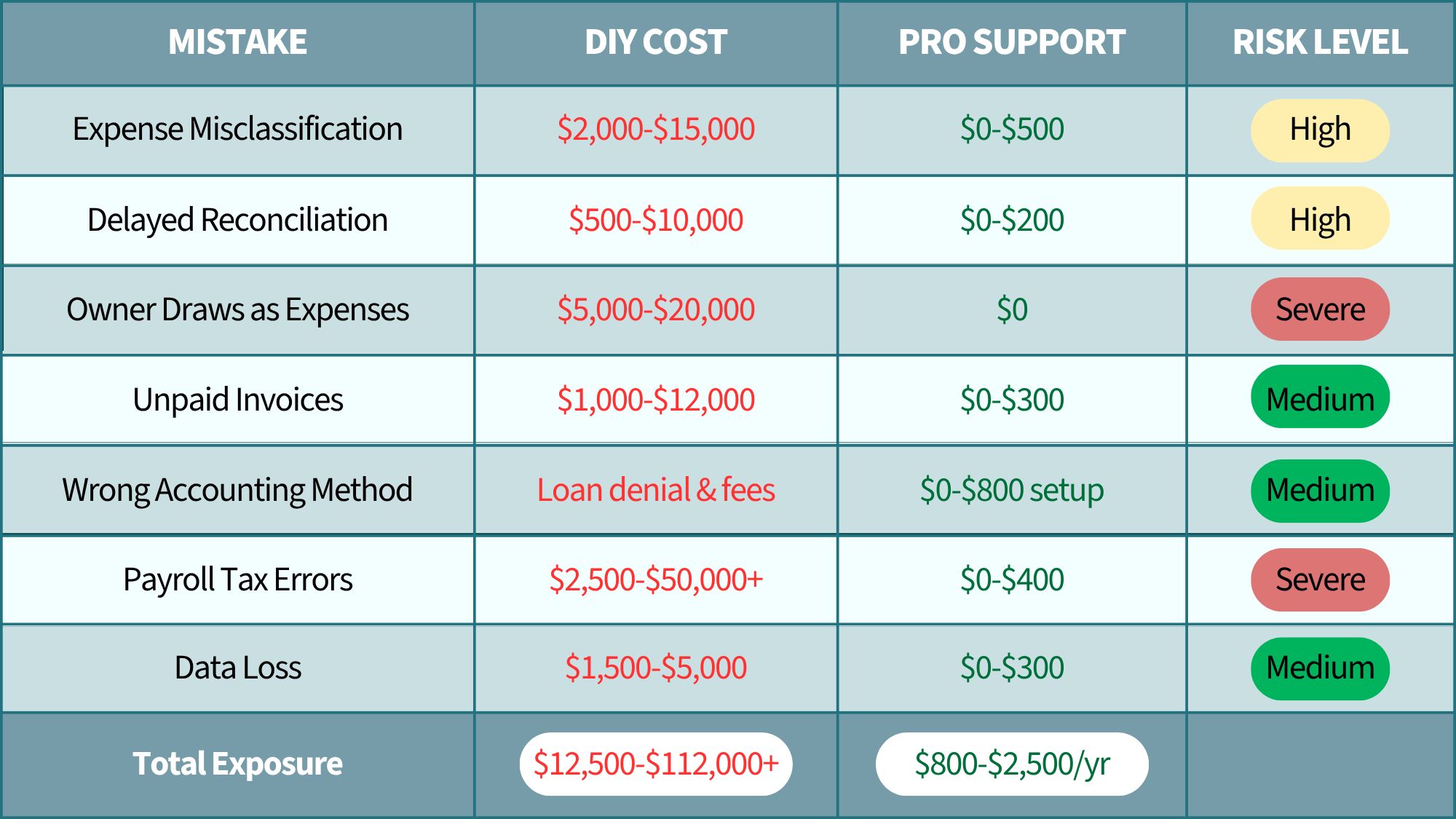
Want the full cost comparison? Read more here.
How Can Professional Support Benefit Your Business?
If any of the six mistakes above sounded uncomfortably familiar, that’s not an accident. They’re familiar because they’re common.
When you compare self-managed QuickBooks to professional bookkeeping support, the difference is having a second set of trained eyes. QuickBooks won’t tell you an expense is misclassified. It won’t flag a missed payroll deposit.
The stakes are too high for trial and error.
Working with our team at MBE CPAs, you can see these positive changes:
- Proper expense categorization
- Maximized deductions
- Monthly reconciliation catches errors fast
- Correct equity treatment from day one
- Clean aging reports
- Timely deposits
- Correct liability tracking
If you’re worried your QuickBooks might have some of these hidden issues, consider partnering with our team. We’ll help you understand where your business stands.